EMDR built for telehealth
Do EMDR with your telehealth clients using tempo-controlled bilateral stimulation (BLS) and optional bilateral audio. No downloads, no extra equipment: just a shared browser tab.
7 days free, then $20 per counselor / month.
From your video call to bilateral stimulation in three steps
Open EMDR in TherapyKit
Launch the EMDR tool from your TherapyKit account in any modern browser, right alongside the video platform you already use.
Share the link
Send your client a session link. They open it in their browser with nothing to download, create or install.
You're ready to go!
Press play and set the tempo for your BLS. Your client will see and hear the changes in real time.
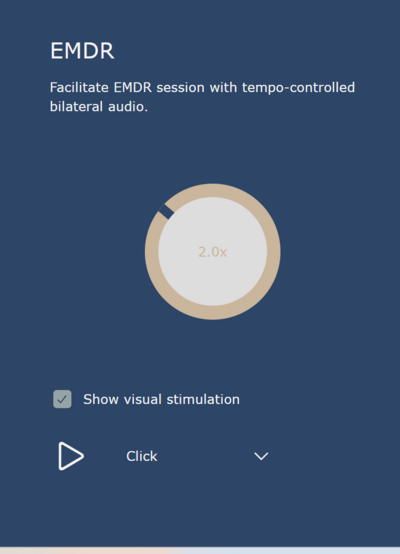
Everything you need on one simple panel
Tempo dial
Turn the dial to speed up or slow down the bilateral rhythm to suit your client and the phase of work.
Bilateral visual stimulation
A calm moving dot travels side to side on your client's screen, keeping time with the tempo you set.
Optional bilateral audio
Add sound that alternates between left and right, and pick the tone from the sound menu, such as a simple click.
Play and pause
Start and stop each set with a single button, right when you need to.
Built exclusively for online sessions
Tempo-controlled bilateral audio
Alternating left-right sound at the pace you choose, delivered straight to your client's browser.
Visual stimulation when you want it
Turn on a calm moving dot for eye movements, or leave it off for audio-only sets.
One link, no downloads
Everything runs in the browser. Clients join with a link, which keeps setup simple for families.
Synced live
Changes you make appear on your client's screen as they happen, so you're working together in the moment.
HIPAA compliant
Built for clinical work, with the same compliance standards as the rest of TherapyKit.
Part of the whole kit
EMDR sits alongside virtual sandtray and TherapyKit's other tools, all in the same account.
More tools for your online sessions
EMDR is one part of the kit. Every TherapyKit tool runs in the same shared browser tab, so you can move from one to the next without sending a new link or asking your client to install anything.
Build a world in the sand tray, map a client's parts, or draw together, then return to EMDR, all in one session.
See what's in the kit


Online Sand Tray
Manipulate sand, add toys, tell stories, and build a world with your client in this classic play therapy activity.

Parts-mapping
Place images on a shared board and draw connections to map a client's inner parts.
Exquisite Corpse
Take turns drawing sections of a picture, then reveal the surprising whole together.
Frequently Asked Questions
Is there a free trial?
Yes. Your first 7 days are free, with every tool in the kit, including EMDR. After that, TherapyKit is $20 per counselor per month.
Does my client need to download anything?
No. TherapyKit runs in the browser. You share a link and your client opens it.
Do I need a separate video platform?
Keep using the telehealth video tool you already use. TherapyKit handles the shared therapeutic tools, including EMDR.
Who controls the bilateral stimulation?
You do. From your panel you start and pause each set, set the tempo, choose the sound and turn visual stimulation on or off. Your client's side follows live.
Does my client need headphones?
Headphones let the audio alternate clearly between ears, so we recommend them. Clients can also follow the visual stimulation on screen.
Bring EMDR into your next online session
Set up in minutes, share a link, and guide bilateral stimulation live with your client. Your first 7 days are free.